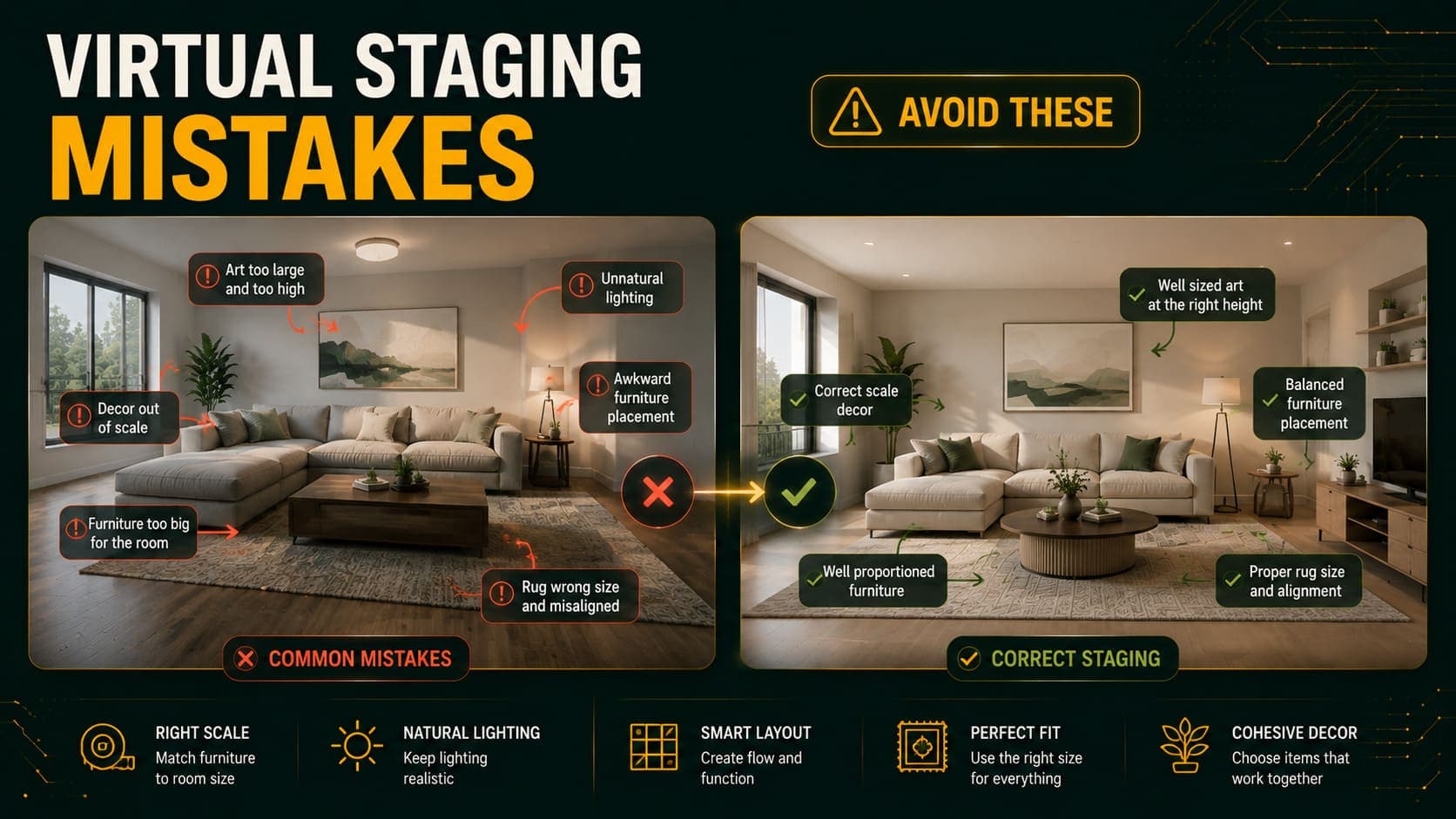
Bad virtual staging is obvious. Furniture floats slightly above the floor, a sofa is scaled for a room twice the size, shadows fall in a direction the windows can't explain. Viewers may not be able to name what's wrong, but they register that something is.
Almost all of it comes from a short list of avoidable errors — and most of them happen before the image ever reaches a staging tool.
Here are the twelve most common, with the specific fix for each.
The Preparation Mistakes
These happen before you take the photo, and they cause the majority of bad output.
1. Staging a Room That Isn't Empty
What it looks like: Furniture overlapping a stray box. Odd artifacts around leftover objects. Generated pieces that seem to merge with things already in the room.
Why it happens: AI staging works by identifying empty floor and wall regions, then generating into them. A cardboard box on the floor gets read as either an obstacle or part of the room's structure — neither is correct.
The fix: Empty the room completely. Every object, including things that feel too small to matter. Cleaning supplies, cables, a single chair, paint tins, bin bags.
This is the single highest-impact fix on this list.
2. Shooting in Poor Light
What it looks like: Dark, muddy images where generated furniture looks pasted on rather than integrated.
Why it happens: The model estimates light direction and intensity to render shadows on generated furniture. In a dim room with ambiguous lighting, that estimation fails, and shadows end up inconsistent with the scene.
The fix: Open every curtain and blind. Turn on every light including lamps. Shoot between 10am and 2pm. Never use flash.
3. Tilting the Camera
What it looks like: Furniture that appears to lean. Vertical lines that converge. A general sense that the perspective is wrong.
Why it happens: The model builds a 3D understanding of the room from the photo. A tilted camera skews that reconstruction, and furniture gets generated to match the skewed geometry.
The fix: Turn on your phone's level indicator — usually under Camera settings as "Grid" or "Level." Keep the crosshairs aligned before shooting.
Try DecoAI Free
3 free credits. No credit card needed. Stage any room in 30 seconds.
Get 3 Free Credits4. Extreme Wide-Angle Distortion
What it looks like: Walls that curve. Furniture stretched at the frame edges. Scale that varies across the image.
Why it happens: Heavy barrel distortion breaks the model's perspective calculation. It maps a straight-line geometry onto a curved image and the result doesn't fit.
The fix: Use 0.5x on a phone rather than a clip-on fisheye lens. Moderate wide-angle captures enough room without breaking the geometry.
5. Shooting from the Middle of a Wall
What it looks like: A flat, cramped composition with minimal floor visible and furniture crowded into a narrow band.
Why it happens: Not an AI error — a composition error. Straight-on shots capture one wall and little floor, leaving the model almost no space to work with.
The fix: Stand in a corner, facing diagonally across the room. This captures two walls and maximum floor area.
The Staging Choice Mistakes
These happen during generation.
6. Selecting the Wrong Room Type
What it looks like: A bed in the living room. A dining table in a bedroom.
Why it happens: The room type dropdown tells the model which furniture category to generate. It follows your instruction, not the room's actual purpose.
The fix: Check the room type setting before every generation. It's a two-second check that prevents a wasted credit.
7. Style Mismatched to the Property
What it looks like: Luxury velvet and gold accents in a budget studio. Industrial metal shelving in a suburban semi. Bohemian layering in a conservative market.
Why it happens: Choosing the style you personally like rather than the one the property and market call for.
The fix:
- Budget and mid-range properties → Modern, Scandinavian, Contemporary
- Family and suburban markets → Traditional, Contemporary
- Premium properties → Luxury or Modern
- Loft conversions with character → Industrial
- Vacation rentals → Scandinavian or Bohemian
Match the price tier. Staging above the property's actual level creates a gap buyers notice at the viewing.
8. Mixing Styles Across the Property
What it looks like: A Modern living room, a Traditional bedroom, and a Bohemian office in the same gallery.
Why it happens: Generating each room independently and picking whichever looked best in isolation.
The fix: Choose one style per property and hold it throughout. Consistency reads as a coherent home; variation reads as disjointed.
9. Accepting the First Result
What it looks like: Mediocre staging when a better version was one click away.
Why it happens: Habit carried over from expensive staging, where each attempt cost real money.
The fix: Generate three to five variations per room. Results vary meaningfully between attempts. At $0.10 each, picking the best from five costs $0.50.
Try DecoAI Free
3 free credits. No credit card needed. Stage any room in 30 seconds.
Get 3 Free CreditsThe Output Review Mistakes
These happen after generation, when the image isn't checked properly.
10. Not Reviewing at Full Size
What it looks like: Published listing photos with visible artifacts that weren't apparent in the thumbnail.
Why it happens: Reviewing on a phone screen or in a small preview. Distortions and errors hide at small sizes.
The fix: Open every staged image at 100% before using it. Specifically check:
- Floor contact — does furniture sit flat, or float slightly?
- Scale — is the sofa plausible relative to the door frame?
- Shadows — do they fall in the same direction as real light from the windows?
- Intersections — does anything pass through a wall or block a doorway?
- Proportions — are all pieces scaled consistently with each other?
11. Over-Furnishing
What it looks like: A room packed with furniture, minimal visible floor, a sense of clutter.
Why it happens: The instinct that more furniture demonstrates more function.
The fix: Perceived room size correlates with visible floor, not with furniture count. If a generation looks crowded, regenerate — most tools produce varying density between attempts.
For small rooms specifically, fewer and slimmer pieces produce a better result than a fully furnished arrangement.
12. Publishing Only Staged Images
What it looks like: A gallery where every image is staged and no unstaged photo exists.
Why it happens: Focusing on presentation without considering what happens at the viewing.
The fix: Include at least one unstaged photo of each staged room. It shows the actual space, builds trust, and prevents surprise when someone walks through the property.
Labelling staged images as "virtually staged" is also standard practice across the industry — most agents do it as a matter of course.
Quick Diagnostic: What's Causing Your Bad Result?
| Symptom | Likely cause | Fix |
|---|---|---|
| Furniture floating | Camera tilt or cluttered floor | Reshoot level, empty room |
| Wrong scale | Depth misread, often from wide-angle | Use 0.5x not fisheye |
| Shadows wrong direction | Poor or ambiguous lighting | Curtains open, lights on, shoot midday |
| Artifacts around objects | Room not fully cleared | Remove everything |
| Cramped composition | Shot from mid-wall | Shoot from a corner |
| Wrong furniture type | Room type setting incorrect | Check dropdown before generating |
| Looks generically wrong | Poor input photo overall | Reshoot properly |
The Meta-Mistake: Blaming the Tool
The most common misdiagnosis is concluding that a tool doesn't work when the actual problem is the input.
Useful test: Take one carefully prepared photo — room completely empty, all lights on, curtains open, shot from a corner at chest height with a level camera at midday. Run it through the tool.
If that produces a good result, the tool works and your other photos need improving.
If it produces a bad result, the tool genuinely struggles with your property type — unusual geometry, non-standard room, or heavy reflective surfaces.
Most of the time it's the first case.
Frequently Asked Questions
Why does my virtual staging look fake?
Most commonly: the room wasn't fully cleared, the lighting was poor, or the camera was tilted. All three break the model's understanding of the room's geometry and lighting.
Why is the furniture floating above the floor?
The model's floor plane estimation was incorrect, usually caused by a tilted camera, extreme wide-angle distortion, or objects left on the floor.
Why is the furniture the wrong size?
Depth estimation misread the room's dimensions. Extreme wide-angle lenses are the most common cause. Reshoot at 0.5x rather than with a fisheye attachment.
How many times should I regenerate an image?
Three to five variations per room is standard practice. At $0.10 per attempt, the cost of picking the best from five is negligible.
Should I use the same style in every room?
Yes. Style consistency across a property reads as coherent. Mixing styles reads as disjointed even to viewers who can't articulate why.
Do I need to include unstaged photos?
It's good practice. It shows the actual space, builds trust with viewers, and prevents any mismatch between listing expectations and the viewing experience.
What's the single biggest mistake?
Staging a room that isn't completely empty. It causes more bad output than any other error and takes fifteen minutes to fix.
Can I fix a bad staged image with editing?
Generally not. Regenerating is faster, cheaper, and produces better results than trying to patch a flawed output.
Why do all my results look bad?
If every variation has the same problem, the issue is the input photo rather than the tool. Reshoot with the room fully cleared, all lights on, from a corner at chest height with a level camera.
Summary Checklist
Before shooting
- Room completely empty — every object
- Floors clean
- All curtains fully open
- Every light on
- Shooting between 10am and 2pm
While shooting
- Standing in a corner, facing diagonally
- Camera at chest height (~1.2m)
- Level indicator on and aligned
- Moderate wide-angle, not fisheye
- Two or three angles per room
While generating
- Room type checked before each generation
- Style matched to property tier and market
- Same style used across the whole property
- Three to five variations per room
Before publishing
- Every image reviewed at full size
- Floor contact, scale, shadows, intersections checked
- Not over-furnished
- At least one unstaged photo per room included
Get it right the first time. DecoAI gives 3 free credits with no card required. Prepare one room using the checklist above and see how much difference the preparation makes.